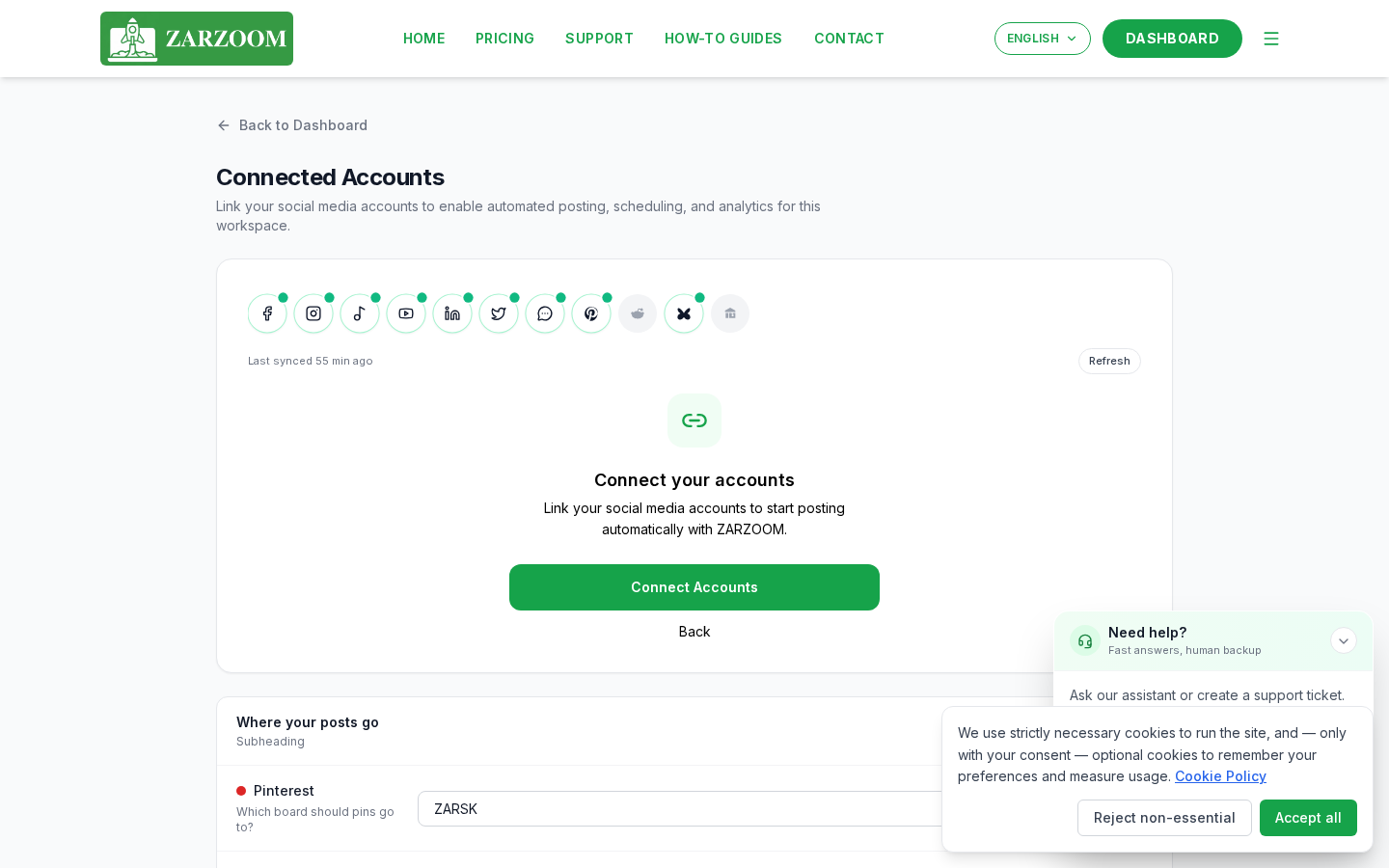
Step 1: Open Connected Accounts
Sign in at zarzoom.com/login-launch, then select Connected Accounts from the left-hand navigation menu. This is the central panel for managing every platform link.
Step 2: Choose a platform to link
Click Add Account and select the platform you want to connect. ZARZOOM supports the following destinations:
- Facebook – publishes to a Facebook Page (not a personal profile)
- LinkedIn – publishes to a LinkedIn Page (company or creator page)
- Pinterest – publishes to a specific Pinterest board
- Reddit – publishes to a specific subreddit
Step 3: Authorise access
A pop-up window will open and take you through the platform's own login and permissions screen. Sign in with the account that owns or administers the destination you want to use, then click Allow (or the equivalent button the platform shows). The pop-up will close automatically once authorisation is complete.
Step 4: Select your posting destination
After authorisation, ZARZOOM will load the destinations available on that account:
- Facebook – choose the specific Page from the dropdown list.
- LinkedIn – choose the specific LinkedIn Page from the dropdown list.
- Pinterest – choose the board you want posts saved to.
- Reddit – enter or select the subreddit you want to post in.
Click Confirm Destination to save your choice. You can return here at any time to change the destination for a connected platform.
Step 5: Repeat for additional platforms
Click Add Account again and repeat Steps 2–4 for each additional platform. You can connect multiple platforms at the same time; each one appears as a separate row in the Connected Accounts panel once confirmed.
Step 6: Use the Refresh control if a connection breaks
Platforms occasionally revoke access tokens — for example, after a password change or a long period of inactivity. If ZARZOOM shows a warning icon next to a connected account, click the Refresh button on that row. You will be taken through the authorisation flow again (Step 3) to restore the connection. No posts are lost, but any scheduled content for that platform will be paused until the connection is refreshed.
Step 7: Confirm analytics are flowing
Once a platform is connected and at least one post has been published through ZARZOOM, analytics data begins to appear in your dashboard. Allow up to 48 hours after your first published post for engagement metrics (likes, shares, clicks, and impressions) to populate. Accounts connected but not yet used for publishing will show no data during this period.
Good to know
- Facebook Pages only. ZARZOOM connects to Facebook Pages, not personal profiles. If you do not see your Page in the dropdown during Step 4, confirm that your personal Facebook account has admin or editor access to that Page.
- One destination per platform connection. Each connected account is tied to one posting destination (one Page, one board, one subreddit). To post to a second destination on the same platform — for example, two different Pinterest boards — add the platform a second time via Add Account and select the alternative destination.
- Subreddit rules are your responsibility. Reddit subreddits have their own posting rules set by moderators. ZARZOOM will attempt to publish to the subreddit you select, but posts may be removed by subreddit moderators if they do not comply with that community's rules. Check the subreddit's guidelines before enabling it as a destination.